
Creating reports
Generate screening and monitoring reports at fund and asset level, and share them with your stakeholders.
Two types of reports
OpenSFDR produces two types of ESG reports, each serving a different purpose in the investment lifecycle:
- Screening reports — Simple, point-in-time evaluations of a potential investment before committing capital.
- Monitoring reports — Detailed, configurable reports for ongoing portfolio holdings, aligned with SFDR reporting obligations.
Screening reports are always at the asset level (for a specific company or property). Monitoring reports can be generated both at the asset level and the financial product level (aggregated across a fund's investments)
Screening reports
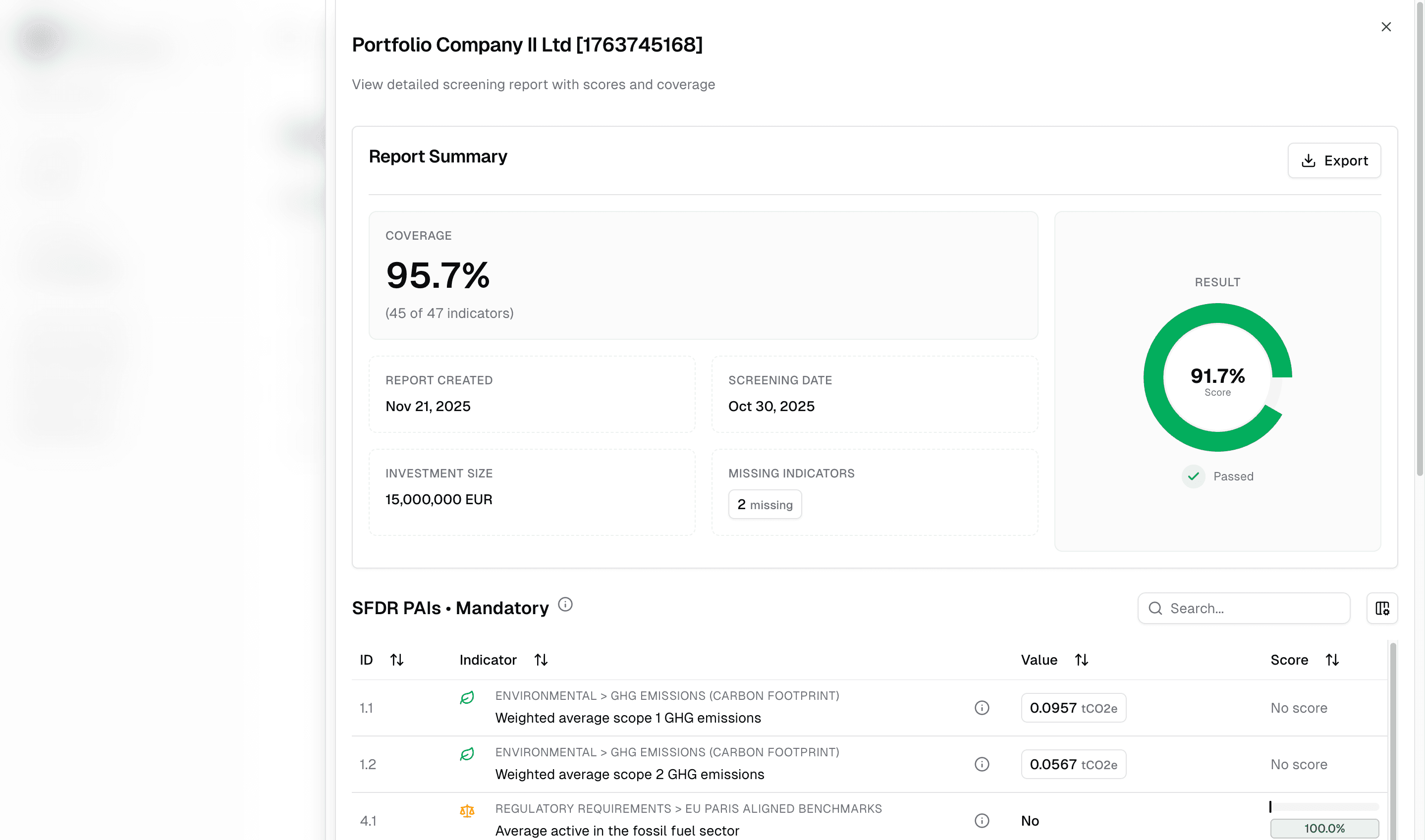
Screening reports are straightforward. They're linked to a screening request, where you ask an asset to provide data for a specific date. When creating the request, you enter the expected investment size — this allows the report to properly calculate financed emissions and other size-dependent indicators.
The report shows how the asset performs against all indicator representations marked for screening in your strategy. If your strategy includes scoring rules, the report also includes a normalized score between 0 and 1 for each indicator, giving you a clear signal of how well the asset meets your criteria. See Screening vs. monitoring for more on how scoring works.
Screening scores are only visible to the owner of the strategy. Connected tenants and portfolio companies do not see the scores.
Monitoring reports
Monitoring reports offer significantly more flexibility and depth. They are the primary tool for ongoing SFDR reporting — whether ad hoc, monthly, quarterly, or annually.
Configuring a monitoring report
When creating a monitoring report, you can configure how the report handles your data:
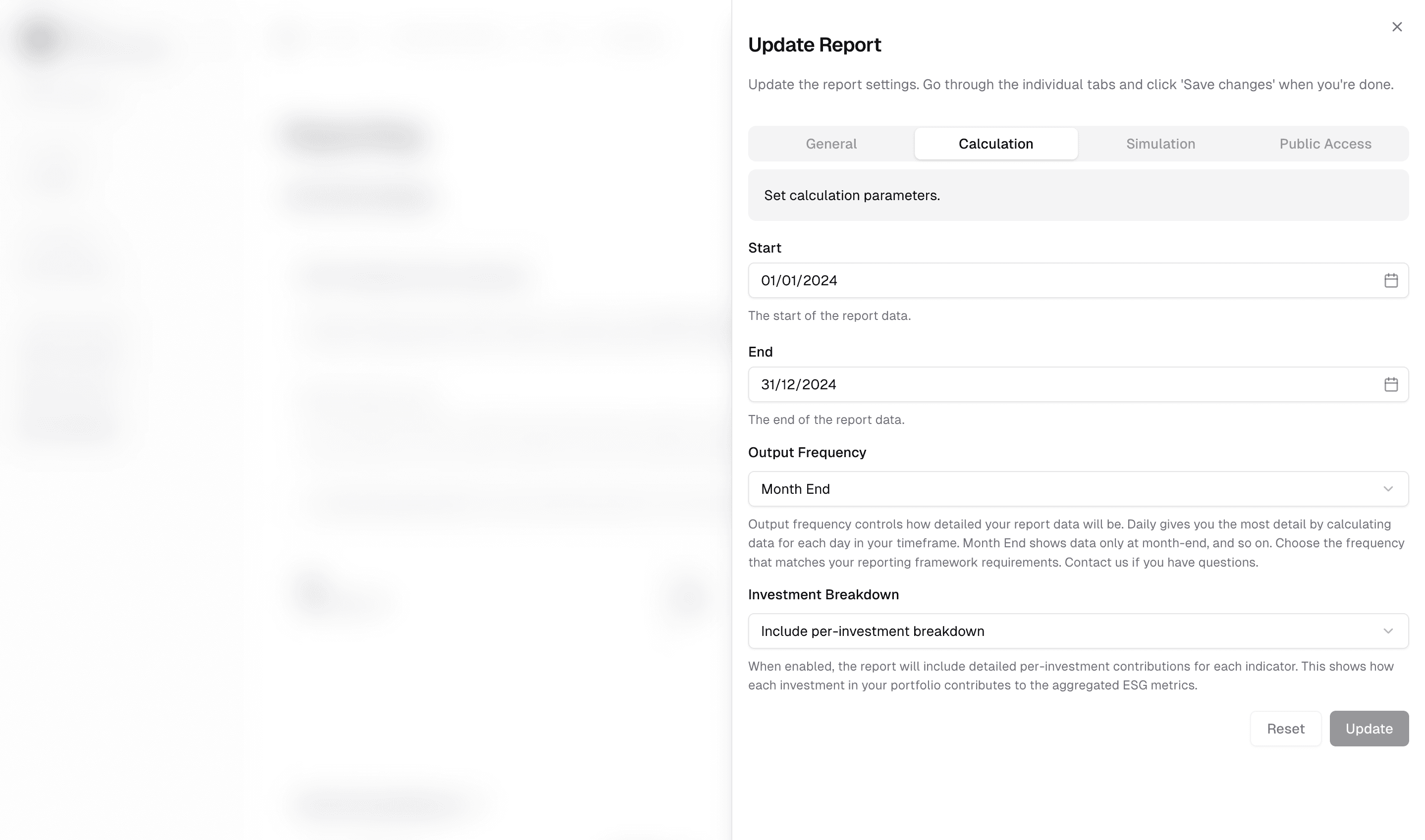
- Timeframe — Choose the reporting period (ad hoc, monthly, quarterly, or annually) depending on whether you're producing regular SFDR disclosures or one-off analyses.
- Simulation methods — Control how OpenSFDR fills gaps in your data. The system automatically selects appropriate methods based on data availability: with fewer data points, it falls back to simpler methods (linear or constant) to avoid unrealistic fluctuations; with more data points, it allows higher-order curves for more accurate results.
- Visibility — Keep the report private or share it publicly (see below).
Because of the simulation logic, you can also generate reports for future periods. OpenSFDR extrapolates from your existing data entries to project indicator values forward, giving you a forward-looking estimate of your ESG performance. This can be useful for planning, target-setting, or previewing how your portfolio might evolve under current trends.
Customizing the report layout
You can adjust how indicators are presented in your monitoring reports:
- Reorder indicators — Arrange indicators in the sequence that makes most sense for your stakeholders.
- Hide indicators — Exclude specific indicators from the report entirely if they aren't relevant for the audience.
This lets you tailor the same underlying data into different presentations for different stakeholders — for example, a detailed version for internal use and a simplified version for LPs.
Understanding data quality metrics
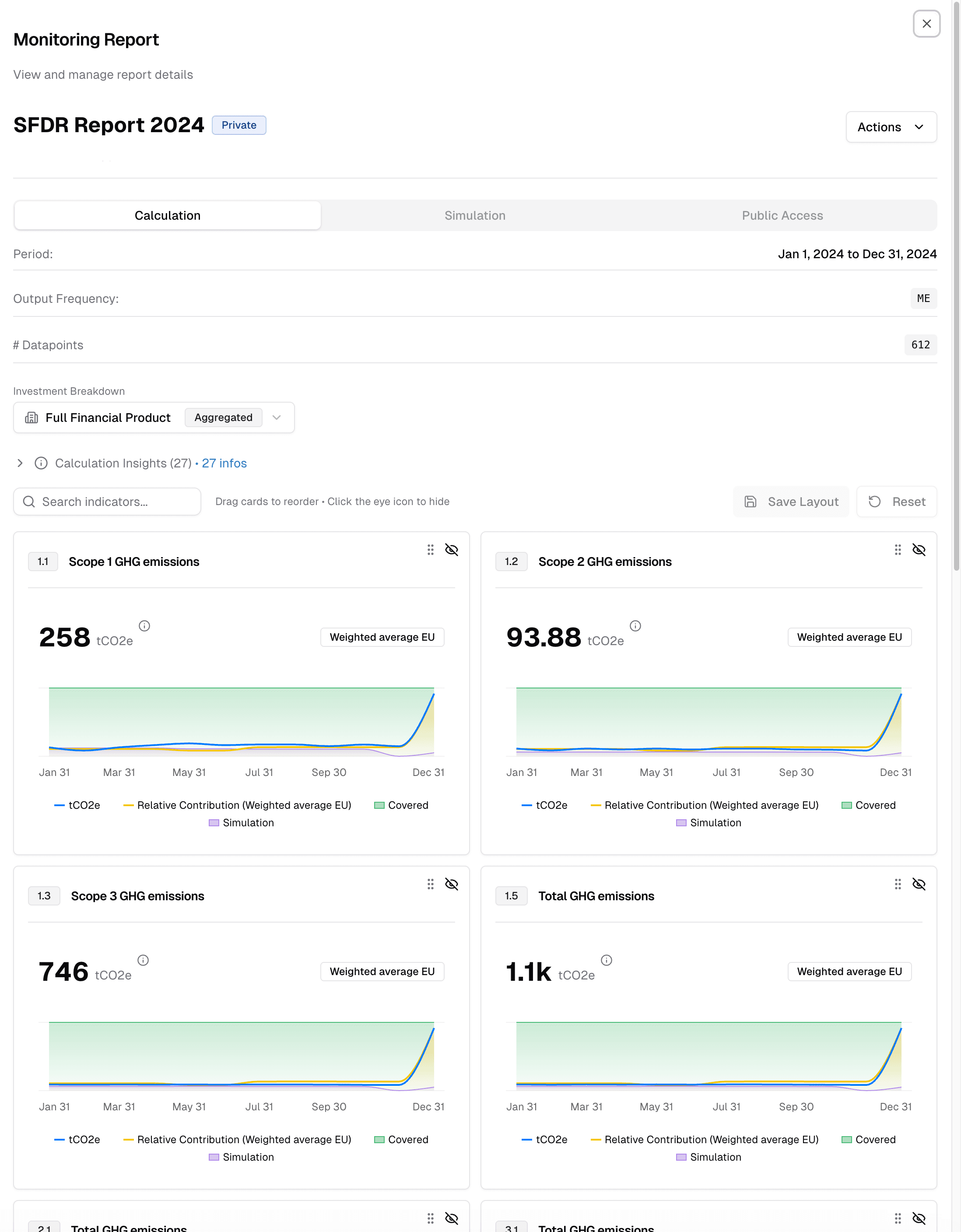
Monitoring reports don't just show you the final numbers — they also tell you how reliable those numbers are through data quality metrics:
| Metric | What it tells you |
|---|---|
| Coverage share | What portion of your result has actual data coverage (higher is better) |
| Estimated share | What portion of your result is derived from estimated rather than reported data |
| Simulation share | What portion relies on simulated or modelled values |
| Not possible share | What portion couldn't be calculated (e.g. the metric doesn't apply to that company type) |
These metrics are weighted by how much each company contributes to the final result — not just by how much capital is invested. This matters because your ownership stake in a company determines how much it influences your fund-level numbers.
OpenSFDR also handles the complexity behind the numbers: currency conversions, estimated vs. reported data, structural exclusions, and more.
Sharing monitoring reports
Monitoring reports can be shared via a public link, hosted on an OpenSFDR.com page. This is an effective way to make your ESG data accessible to stakeholders while remaining in full control.
When you share a report:
- The link stays current — Update the underlying data and the link continues to reflect the latest version.
- You can track views — See how many people have accessed the report.
- You can revoke access — Remove the report at any time so it's no longer accessible.
Configuring a shared report
- Password protection — Add a password to restrict who can view the report. For highly confidential data, consider keeping the report private and sharing access through tenant connections instead.
- Styling and ordering — Adjust which indicators appear and in what order (same customization options as above).
- Investment breakdown — Choose whether to include per-investment detail or show only the aggregate.
- CSV download — Allow viewers to download the data for further processing.
Exporting data
Reports are also the recommended way to export your ESG data from OpenSFDR. Because reports let you configure a reference timeframe (daily, month-end, quarterly, annual), the exported file contains data in a practical, structured format rather than raw individual data entries.
To export data:
- Go to Reporting and create a new monitoring report (or open an existing one).
- Configure the timeframe and simulation settings to match the format you need.
- Open the report and click Actions → Export → CSV.
The exported CSV reflects exactly what the report shows — including aggregated values, coverage metrics, and the timeframe you selected. This works for both asset-level and fund-level monitoring reports.
If you need a full raw data export beyond what reports provide, contact support@opensfdr.com.
What's next?
- Managing ESG data — Ensure your data is complete before generating reports
- Managing ESG strategies — Adjust which indicators appear in your reports
- Screening vs. monitoring — Understand scoring rules and the difference between pre-investment and ongoing evaluation